Text Processing with grep, sed, and awk
In this section we will be learning about: grep, sed, and awk.
Learning Objectives
By the end of this section, you should be able to:
- Use regular expressions for targeted pattern matching
- Extract matching lines with
grep - Replace text safely with
sed - Filter and compute columnar data with
awk
Regex Fundamentals for grep
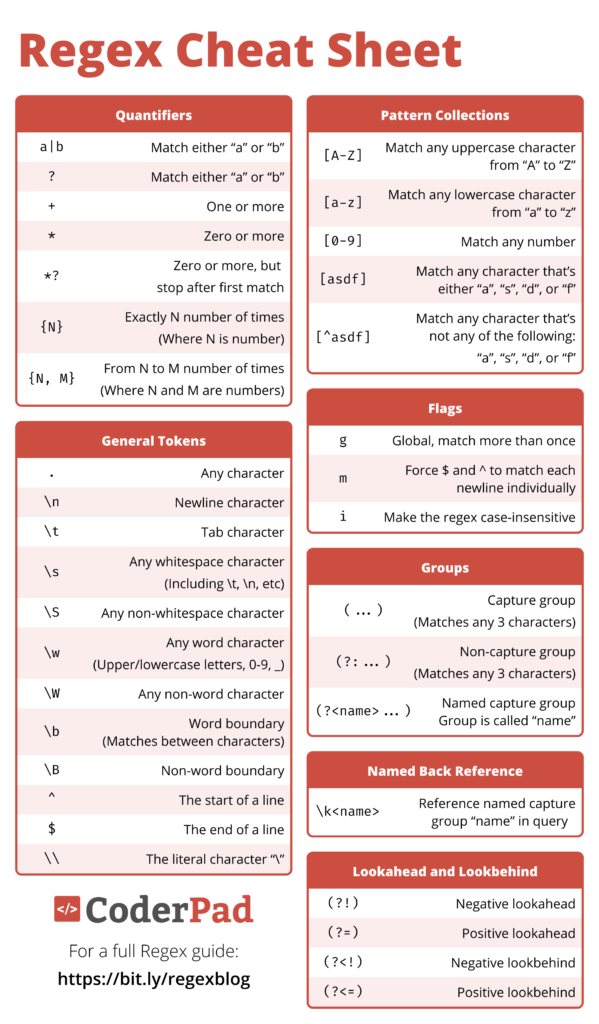
Before jumping into advanced grep patterns, here are the most useful regex pieces:
.any single character*zero or more of the previous token+one or more of the previous token[abc]any one character from a set[0-9]any single digit^start of line anchor$end of line anchor
Examples:
For this section, we will be using a Tab-Separated Value file (TSV) of genomic annotation data for the SARS-CoV-2 genome. Please download it into the testdata1 folder and extract it with the following commands.
(base) [user@login-0 testdata1]$ wget [https://ftp.ensemblgenomes.ebi.ac.uk/pub/bacteria/release-60/gff3/bacteria_26_collection/escherichia_coli_w_gca_000184185/Escherichia_coli_w_gca_000184185.ASM18418v1.60.gff3.gz](https://ftp.ensemblgenomes.ebi.ac.uk/pub/bacteria/release-60/gff3/bacteria_26_collection/escherichia_coli_w_gca_000184185/Escherichia_coli_w_gca_000184185.ASM18418v1.60.gff3.gz)
(base) [user@login-0 testdata1]$ gunzip Escherichia_coli_w_gca_000184185.ASM18418v1.60.gff3.gz
grep: Extracting patterns from files
grep is a keyword or pattern search utility for text files in Linux. Let's say we want to find a particular keyword in a large text file, in this case "dnaJ". We can search it with grep.
(base) [user@login-0 testdata1]$ grep "dnaJ" Escherichia_coli_w_gca_000184185.ASM18418v1.60.gff3
Chromosome      MGnify  gene    15446   16576   .       +       .       ID=gene:ENSB:E70oycXiQ_z2Pb6;Name=dnaJ;biotype=protein_coding;description=Chaperone protein DnaJ;gene_id=ENSB:E70oycXiQ_z2Pb6;logic
_name=prokka
Great! Let's say we know there are other keywords that we want to find. In this example, other terms with dna followed by a letter. We can use REGEX to encode the pattern search.
(base) [user@login-0 testdata1]$ grep -e "dna\w" Escherichia_coli_w_gca_000184185.ASM18418v1.60.gff3
Chromosome      MGnify  gene    13441   15357   .       +       .       ID=gene:ENSB:QdBAzb1hquUQV0h;Name=dnaK_1;biotype=protein_coding;description=Chaperone protein DnaK;gene_id=ENSB:QdBAzb1hquUQV0h;logic_name=prokka
Chromosome      MGnify  gene    15446   16576   .       +       .       ID=gene:ENSB:E70oycXiQ_z2Pb6;Name=dnaJ;biotype=protein_coding;description=Chaperone protein DnaJ;gene_id=ENSB:E70oycXiQ_z2Pb6;logic_name=prokka
Let's update the command to only search for the identifiers that match "dna", Single Letter Code, underscore, then a digit 0-9.
(base) [user@login-0 testdata1]$ grep -e "dna\w_[0-9]" Escherichia_coli_w_gca_000184185.ASM18418v1.60.gff3
Chromosome      MGnify  gene    13441   15357   .       +       .       ID=gene:ENSB:QdBAzb1hquUQV0h;Name=dnaK_1;biotype=protein_coding;description=Chaperone protein DnaK;gene_id=ENSB:QdBAzb1hquUQV0h;logic_name=prokka
Try this as an exercise. How many genes are present in the file?
(base) [user@login-0 testdata1]$ grep -e "\sgene\s" Escherichia_coli_w_gca_000184185.ASM18418v1.60.gff3 | wc -l
4707
If you aren't familiar with REGEX, a cheat sheet is included below.
sed: Stream editing for find-and-replace operations
sed is a powerful find/replace tool for Unix. The syntax of the command is s/SEARCHTERM/REPLACEMENTTERM/g.
In our example file, let's replace "Chromosome" with "Chr1".
(base) [user@login-0 testdata1]$ sed 's/Chromosome/Chr1/g' Escherichia_coli_w_gca_000184185.ASM18418v1.60.gff3
Notice, the text gets printed to the screen. We would need to use command line redirection to save the file changes. However, we can't overwrite the same file as it is processing. In order to replace the text within the original file, we have to use the -i option for Modifying the file "In-Place".
(base) [user@login-0 testdata1]$ sed -i 's/Chromosome/Chr1/g' Escherichia_coli_w_gca_000184185.ASM18418v1.60.gff3
awk: Powerful text processing and column extraction
awk is a powerful text-processing utility in Unix/Linux, used for pattern scanning, processing, and reporting. It is particularly useful for working with structured data, like CSV files, logs, and text files where data is organized into fields (often delimited by spaces, tabs, or other characters).
awk has trickier syntax, so let's review the general rule:
- pattern: Specifies the condition or criteria to match (e.g., lines containing a specific word).
- action: The operation to perform on lines that match the pattern (e.g., printing a specific field or modifying the content).
- input_file: The file on which awk will operate. If not provided, it reads from standard input (stdin).
Records: Typically, each line of a file is a record. Fields: Each record (line) is divided into fields, by default using whitespace (spaces or tabs). You can refer to these fields as $1, $2, $3, etc. for the first, second, third fields, respectively. $0 refers to the entire line.
Let's try printing the full line with the first awk command, then try again printing the third column, fourth, and fifth.
(base) [user@login-0 testdata1]$ awk '{print $0}' Escherichia_coli_w_gca_000184185.ASM18418v1.60.gff3
(base) [user@login-0 testdata1]$ awk '{print $3, $4, $5}' Escherichia_coli_w_gca_000184185.ASM18418v1.60.gff3
Great, let's modify this command so that there is more descriptive summary. Let's put the text: "Category: $3, Start: $4, End: $5"
(base) [user@login-0 testdata1]$ awk '{print "Category: "$3", Start: "$4", End: "$5}' Escherichia_coli_w_gca_000184185.ASM18418v1.60.gff3
Notice, in the output, there are some lines that have blank values, but the static text gets printed for every line. Let's add a search term to only search pattern for genes within the third column.
(base) [user@login-0 testdata1]$ awk '$3 == "gene" {print "Category: "$3", Start: "$4", End: "$5}' Escherichia_coli_w_gca_000184185.ASM18418v1.60.gff3
Let's add a computed value for length, which is end value minus start value.
(base) [user@login-0 testdata1]$ awk '$3 == "gene" {print "Category: "$3", Start: "$4", End: "$5", Length: "$5-$4}' Escherichia_coli_w_gca_000184185.ASM18418v1.60.gff3
Now, let's say we want to only inspect elements with a length over 1000.
(base) [user@login-0 testdata1]$ awk '$3 == "gene" && $5-$4 > 1000 {print "Category: "$3", Start: "$4", End: "$5", Length: "$5-$4}' Escherichia_coli_w_gca_000184185.ASM18418v1.60.gff3
Lastly, let's add a counter to find out the number of records that pass these filtering criteria.
(base) [user@login-0 testdata1]$ awk '$3 == "gene" && $5-$4 > 1000 {print "Category: "$3", Start: "$4", End: "$5", Length: "$5-$4; count++ } END { print "Total records matching criteria:", count }' Escherichia_coli_w_gca_000184185.ASM18418v1.60.gff3
Challenge: Filter and Summarize Genes
Using the same GFF3 file, complete the following tasks:
- Count genes with length greater than 500.
- Print only the start and end coordinates for those genes.
- Save the output to
long_genes.tsv.
One possible solution: